Two steps, and only one of them happens in the platform
Creating a station in the platform registers it: the platform learns the station’s model, its connectors, its owner, its location, and its price. It does not yet know the physical unit standing at the site, because nothing has introduced the two to each other.
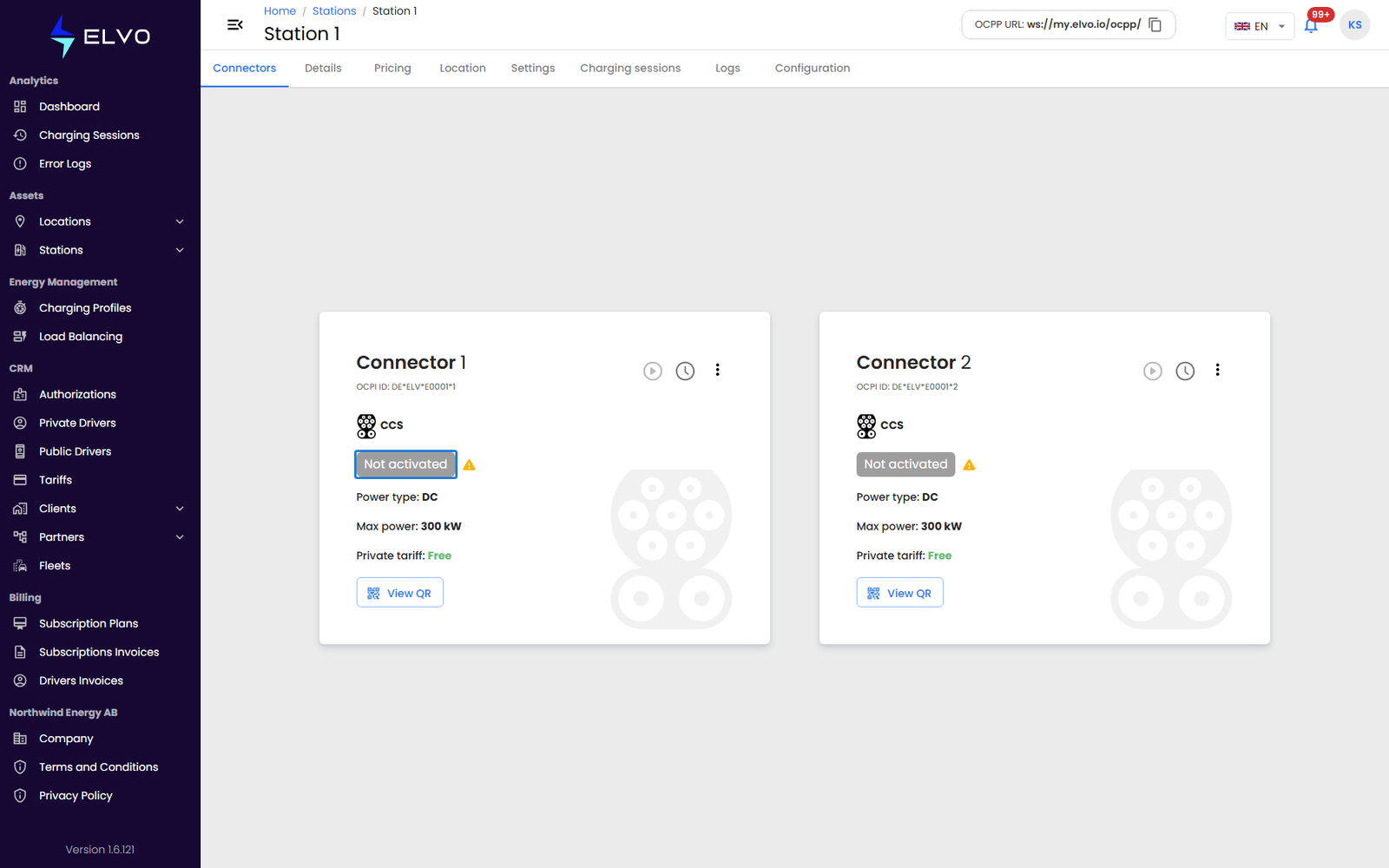
A new station therefore carries the status Not activated, and stays there until the station itself calls the platform. The station makes that call over OCPP, using an address you set in the station’s own configuration.
Bringing a station online is two steps:
- Create the station in the platform — sections 4.2 and 4.3.
- Point the physical station at the platform — described below.
Step 1 — Create the station in the platform
Use Add Station to add one station and fill in its details by hand (section 4.2), or Add Multiple Stations to add several at once from an Excel file (section 4.3). Either way, the new station appears in the stations list with the status Not activated.
One field from that step matters more than the rest: the Id you enter on the wizard’s Details step, or the ID column of the Excel template. This is the name the physical station must give when it calls the platform. If the two differ by even one character, the call arrives as an unknown station and is refused. Note the Id down before you leave the wizard — you need it in step 2.
Step 2 — Point the station at the platform
The address the station needs is on screen at all times, in the top-right corner of the header, labelled OCPP URL. Click the box to copy it to your clipboard.

The address ends in /ocpp/ — for example ws://my.elvo.io/ocpp/. If your
company uses a branded platform address, yours will differ, so copy it from
the header rather than typing it from memory.
Now open the station’s own configuration — through its screen, its web interface, or the configuration tool its manufacturer provides — and set two values:
- the OCPP server address, to the address you copied;
- the station’s OCPP identity, to the Id you gave the station in step 1. Manufacturers name this field differently: charge point ID, charge box identity, or simply station name are all common.
Some stations ask for the two separately. Others ask for a single full
address, in which case the Id goes on the end, after the trailing slash:
ws://my.elvo.io/ocpp/YOUR-STATION-ID.
Where these fields live differs from one manufacturer to the next.
Checking that it worked
As soon as the station connects, it reports its own state and the platform updates the status by itself. Nothing needs to be saved or refreshed on your side.
In the stations list, the station’s status changes from Not activated to Available. On the station’s own page, the same change appears on each connector card (see section 5.2).
A station that has connected at least once and later loses its link reads Offline rather than Not activated. The distinction is worth knowing: Not activated means the platform has never once heard from the station, while Offline means it has, and the link has dropped since.
If the station stays “Not activated”
Work through these in order.
- The address. Copy it from the header again and compare it character
by character against what is set in the station. A missing trailing
slash, or
wss://where the platform givesws://, is enough to stop the connection. - The identity. Compare the station’s OCPP identity against the Station ID column in the stations list. They must match exactly, capital letters included.
- The station’s own connection. The station needs working internet of its own. On a station that connects over a SIM card, check that the card is active and still has data.
- The site network. On a company or site network, outgoing WebSocket traffic to the platform may be blocked. Ask whoever manages that network to allow it.